Isolate endpoint - Crowdstrike
Browse: 🏠 · Solutions · Connectors · Methods · Tables · Content · Parsers · ASIM Parsers · ASIM Products · Logic Apps · 📊
When a new Microsoft Sentinel incident is created, this playbook gets triggered and performs below actions:
| Attribute | Value |
|---|---|
| Type | Playbook |
| Solution | CrowdStrike Falcon Endpoint Protection |
| Source | View on GitHub |
Logic App Connectors
This playbook uses 3 Logic App connectors / built-in actions:
| Connector / Action | Type | Connections | Actions |
|---|---|---|---|
azuresentinel |
Managed | 1 | 3 |
http |
Built-in | 0 | 3 |
workflow |
Built-in | 0 | 1 |
Action parameters (URLs, paths, function IDs)
azuresentinel (Managed)
| Action | Method | Endpoint | Other |
|---|---|---|---|
| Add_comment_to_incident_(V3) | post | /Incidents/Comment |
— |
| Update_incident | put | /Incidents |
— |
| Entities_-_Get_Hosts | post | /entities/host |
— |
http (Built-in)
| Action | Method | Endpoint | Other |
|---|---|---|---|
| HTTP_-Get_device_information | GET | @{body('CrowdStrike_Base')?['FalconHost']}/devices/entities/devices/v1?ids=@{body('Parse_JSON_Get_device_id_response')?['resources']?[0]} |
— |
| HTTP_-_Contain_a_host | POST | @{body('CrowdStrike_Base')?['FalconHost']}/devices/entities/devices-actions/v2?action_name=contain |
— |
| HTTP_-_Get_device_id | GET | @{body('CrowdStrike_Base')?['FalconHost']}/devices/queries/devices/v1?filter=hostname:'@{body('Entities_-_Get_Hosts')?['Hosts']?[0]?['HostName']}' |
— |
workflow (Built-in)
| Action | Method | Endpoint | Other |
|---|---|---|---|
| CrowdStrike_Base | — | — | workflowId=[concat('/subscriptions/', subscription().subscriptionId, '/resourceGroups/', resourceGroup().name ,'/providers/Microsoft.Logic/workflows/', parameters('CrowdStrike_Base_Playbook_Name'))]triggerName= manual |
Additional Documentation
📄 Source: CrowdStrike_ContainHost/readme.md
Crowdstrike ContainHost
Summary
When a new Microsoft Sentinel incident is created, this playbook gets triggered and performs below actions:
Fetches the device information from Crowdstrike
Contain host if it is not already contained
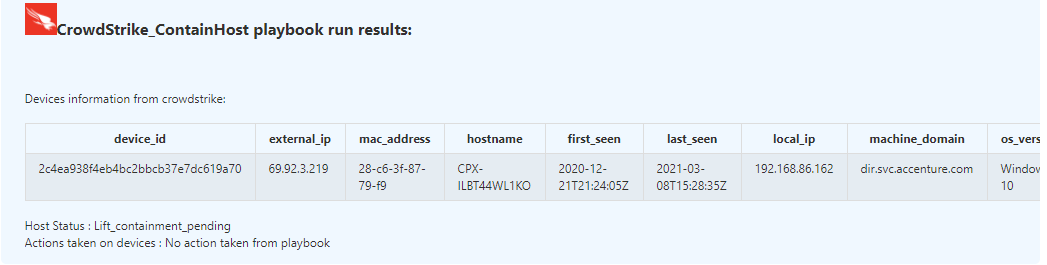
Enrich the incident with device information from Crowdstrike
Close the incident if contained the host
Prerequisites
- Azure Key vault is required for storing the Crowdstrike ClientID and Secrets, create key vault if not exists learn how
- Add Crowdstrike Client ID and Client Secret in Key vault secrets and capture the keys which are required during the template deployment
- CrowdStrike_Base playbook needs to be deployed prior to the deployment of this playbook under the same subscription and under the same resource group.
- CrowdStrike_Base playbook needs to be added in the access policy of the Key Vault learn how
Deployment instructions
Deploy the playbook by clicking on "Deploy to Azure" button. This will take you to deploying an ARM Template wizard.
Fill in the required parameters:
- Playbook_Name: Enter the playbook name here (Ex:Crowdstrike_ContainHost)
- CrowdStrike_Base_Playbook_Name : Enter the base playbook name here (Ex:CrowdStrike_Base)
Post-Deployment instructions
a. Authorize connections
Once deployment is complete, you will need to authorize connections.
- Click the Microsoft Sentinel connection resource
- Click edit API connection
- Click Authorize
- Sign in
- Click Save
b. Configurations in Sentinel
- In Microsoft sentinel analytical rules should be configured to trigger an incident with risky device
- Configure the automation rules to trigger this playbook
Playbook steps explained
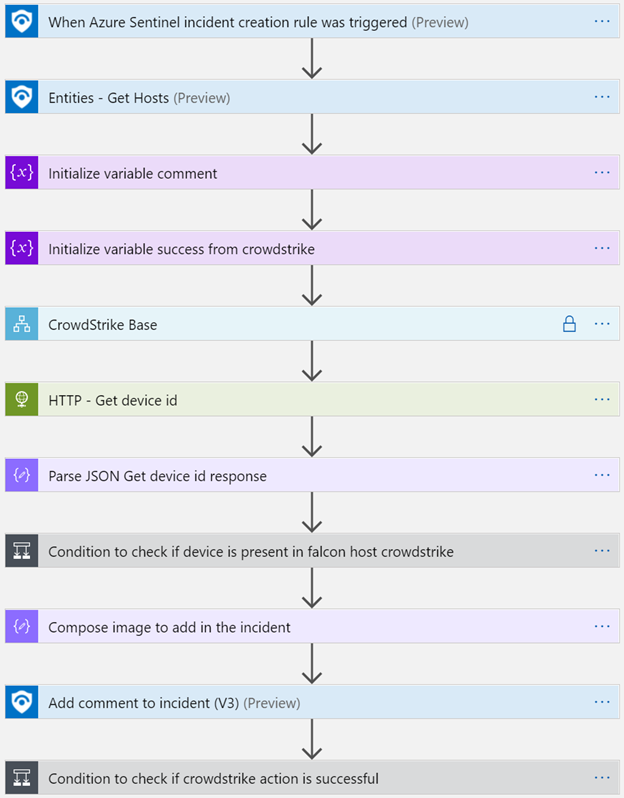
When Microsoft Sentinel incident creation rule is triggered
Microsoft Sentinel incident is created. The playbook receives the incident as the input.
Entities - Get Hosts
Get the list of risky devices as entities from the Incident
Initialize variable comment
Initialize a string variable to hold comments to update in the incident
Initialize variable success from crowdstrike
Initialize a string variable to hold the success or failure information from crowdstrike api actions
CrowdStrike Base
Call the base logic App to get access token and Falcon Host URL
HTTP - Get device id
This gets the device id from crowdstrike filtered by hostname
Parse JSON Get device id response
This prepares Json message for the device id response
Condition to check if device is present in crowdstrike
- If device is present, get the device information from crowdstrike API and prepares HTML table with required information
- Checks the device status, if not contained/normal the playbook will contain the device
Compose image to add in the incident
This action will compose the Crowdstrike image to add to the incident comments
Add a comment to the incident with the information
This action will enrich the incident with the constructed HTML table with device information
Condition to check if playbook contained the device
If playbook contained the device, then close the incident with proper closure comments
Browse: 🏠 · Solutions · Connectors · Methods · Tables · Content · Parsers · ASIM Parsers · ASIM Products · Logic Apps · 📊
↑ Back to Playbooks · Back to CrowdStrike Falcon Endpoint Protection